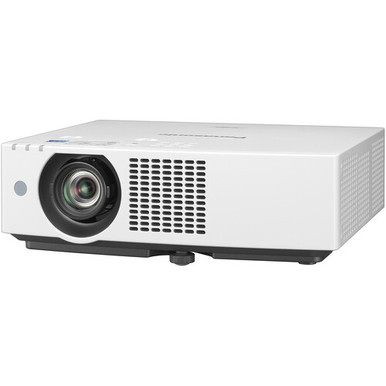
Display System 3-Chip 0.64″ LCD
Native Resolution 1920 x 1200
Maximum Brightness 6200 Lumens
Throw Ratio 1.09 to 1.77:1
HDR Support No
Inputs/Outputs 2x HDMI Audio, Video Input 2x DE-15/DB-15 (VGA) Video Input 2x 1/8″ / 3.5 mm Mini Audio Input 1x 1/8″ / 3.5 mm Mini Audio Output 1x DE-9/DB-9 (RS-232) Control Input 1x RJ45 (HDBaseT) Data Input/Output 1x RJ45 (Ethernet) LAN Input/Output 1x USB-A Power Output
Light Source Laser Phosphor
Aspect Ratio 16:10
Dynamic Contrast Ratio 3,000,000:1, 3,000,000:1 Lens Includes Lens Yes Focus Manual Aperture f/1.6 to 2.12
Includes Lens Yes
Focus Manual
Aperture f/1.6 to 2.12
Focal Length 15.3 to 24.64mm
Lens Shift Vertical: 44% Horizontal: 20%
Optical Zoom Manual: 1.6x
Keystone Correction Vertical: 25 Horizontal: 35
Multi-Input Support (PIP/PBP) Not Specified by Manufacturer
Ceiling Mountable Yes
Built-In Speaker Yes (Mono)
Speaker Power 10 W
HDCP Support Not Specified by Manufacturer
Mobile App Compatible Yes: Android & iOS
Bluetooth No
Expected Lamp Life Medium Brightness: 20,000 Hours Low Brightness: 24,000 Hours
Fan Noise Medium Brightness: 36 dB Low Brightness: 26 dB
Input Power 100 to 240 VAC, 50 / 60 Hz
Power Consumption Full Brightness: 370 W Medium Brightness: 335 W Low Brightness: 235 W
Operating Conditions 32 to 113 F / 0 to 45 C at 20 to 80% Humidity
Dimensions (W x H x D) 15.7 x 4.5 x 13.7″ / 399.0 x 115.0 x 348.0 mm ((Not Including Protruding Parts)) 15.7 x 5.2 x 13.7″ / 399.0 x 133.0 x 348.0 mm (With Feet at Shortest Position)
Weight 15.2 lb / 6.9 kg
Package Weight 22 lb
Box Dimensions (LxWxH) 22 x 17.5 x 10″
Panasonic VMZ61U7 Overview Daylight View Basic enhances image sharpness by clarifying detail definition in dark areas of the picture, which can be difficult to see in bright light. A sensor measures the amount of ambient light in the room and optimizes halftone color and brightness for the best results according to surrounding levels of illumination.
Eco-Friendly Power Consumption The projector uses about 20% less energy than the previous series. Efficiency is further increased, and brightness is optimized to suit ambient light levels, just by pressing the ECO2 button on the remote control. Adopting energy-efficient Panasonic projection in your meeting rooms or learning spaces helps you to achieve CSR environmental policy objectives while reducing waste. Easy Maintenance
Digital Zoom Extender This projector features a 6-point screen correction. It allows you to perform 4-corner and horizontal/vertical keystone correction via remote control to remove trapezoidal distortion when projecting from an angle, such as a high ceiling. An extra two control points located at the center top and bottom of the screen can be used to remove distortion when projecting an image into the corner of a room., accepts 4K video input signals via DIGITAL LINK and HDMI terminals. This is a big advantage when integrating the projectors into existing 4K-ready system infrastructure where 4K signals are distributed to a network of display endpoints with different screen resolutions without having to use an external converter or reencode the source. Single-Cable DIGITAL LINK
Digital Zoom Extender Easy Operation with Dual CEC HDMI Inputs
Digital Zoom Extender HDMI inputs are compatible with control signals sent via a CEC command, giving you limited control over the projector using the compatible source device’s remote control. The projector powers up from standby and commences playback automatically on command from a compatible player, such as an optional Wireless Presentation System PressIT, when connected to the projector via HDMI.
Digital Zoom Extender 4K Input Support with HDMI and DIGITAL LINK
Digital Zoom Extender DIGITAL LINK is a single-cable AV and control solution based on HDBaseT that supports 4K video, audio, and control-signal transmission via a single Cat 5e STP cable (or higher) for distances of up to 164′ or 492′ for 1080p video, reducing cabling cost and installation complexity when projectors are at a long distance from the server room.
Digital Zoom Extender You can control the projector via a dedicated LAN terminal or the HDBaseT-based DIGITAL LINK connection. Both interfaces support 100Base-TX and 10Base-T compatible control signals via Panasonic, PJLink, Crestron Connected, AMX DD, and Extron device control and management applications. Screen Adjustment Function
Digital Zoom Extender Screen Adjustment fits the image to the screen when projecting from an unusual angle. Curved Screen Correction removes barrel or pincushion distortion for projection onto curved surfaces. Shutter Function
Digital Zoom Extender Press a button on top of the unit or on the remote control to block light output temporarily via the shutter function. This feature is useful when taking a short recess during lessons or meetings, or whenever you want to pause content without showing an image, but keep the projector on and ready to go again instantly.
PressIT One-Press Wireless Solution Power Selected Devices via USB-DC Terminal
PressIT One-Press Wireless Solution The projector includes a 5V/2A USB-DC terminal to power optional Wireless Presentation PressIT or a compatible HDMI media streaming device for a neat installation on the ceiling without the need for extra AC outlets.
Quiet Operation to Limit Distractions The projector also features Panasonic’s SOLID SHINE Laser technology and long-life ECO Filter, which do not require replacement for 20,000 hours when used in a typical office or classroom environment. As well as reducing the cost, hassle, and callout frequency of projector maintenance, you don’t need to keep a large inventory of consumable parts on hand since ECO Filter can be washed and reused up to two times.
Quiet Operation to Limit Distractions Multi Monitoring and Control Software with Optional Early Warning Functions
Quiet Operation to Limit Distractions Simple Operation with Auto Signal Switching
Quiet Operation to Limit Distractions This projector makes life easy for faculty and staff, who use the projectors every day. Auto Input-Signal Search function detects the active source device, switches to the corresponding input, and allows playback to commence without the user having to manually perform these operations.
When the projector is switched on, the startup screen is displayed almost instantly at full brightness, with no gradual fade-in you expect from a lamp projector. This helps to maintain the momentum of your lesson or meeting. And unlike lamp projectors, you can switch off the projector and unplug it without waiting for cooldown. Direct Power Off function allows the projector to be safely shut off via the room’s breaker switch.
Plug-and-Play Display with Memory Viewer You don’t even need a computer to start presenting-just insert a USB memory device containing compatible still images to the projector’s USB port, press the NETWORK/USB button on the remote, select MEMORY VIEWER, and start presenting. Advance or go back to the previous slide using the arrow keys on the remote. Additional Features
Plug-and-Play Display with Memory Viewer Supports Crestron Connected, Extron, AMX DD, and PJLink 10W speaker and microphone input Free 360 installation
ECO Management System with 0.5W standby Presentation Support System Startup Logo function Emulation function Presenter Light software
Plug-and-Play Display with Memory Viewer Audio Standby mode DICOM Simulation mode Panasonic VMZ61U7 Specs Display System 3-Chip 0.64″ LCD
Plug-and-Play Display with Memory Viewer Native Resolution 1920 x 1200 Maximum Brightness 6200 Lumens
Plug-and-Play Display with Memory Viewer Throw Ratio 1.09 to 1.77:1
HDR Support No Inputs/Outputs 2x HDMI Audio, Video Input
2x DE-15/DB-15 (VGA) Video Input 2x 1/8″ / 3.5 mm Mini Audio Input 1x 1/8″ / 3.5 mm Mini Audio Output 1x DE-9/DB-9 (RS-232) Control Input 1x RJ45 (HDBaseT) Data Input/Output
1x RJ45 (Ethernet) LAN Input/Output
1x USB-A Power Output Light Source Laser Phosphor Image Display Display System 3-Chip 0.64″ LCD, Power Output HDCP Support
HDR Support No Inputs/Outputs Native Resolution 1920 x 1200 Maximum Brightness 6200 Lumens
HDR Support No Inputs/Outputs Aspect Ratio 16:10
HDR Support No Inputs/Outputs Focal Length 15.3 to 24.64mm
Lens Shift Vertical 44%, 25
Lens Shift Horizontal 20% Optical Zoom, 35
Lens Shift Manual 1.6x
Lens Shift Throw Ratio 1.09 to 1.77:1 Features Keystone Correction
HDR Support No Multi-Input Support (PIP/PBP)
HDR Support No Not Specified by Manufacturer Ceiling Mountable Yes Built-In Speaker Yes (Mono) Speaker Power 10 W
Input/Output Connectors Inputs/Outputs 2x HDMI Audio, Video Input
Input/Output Connectors Inputs/Outputs Not Specified by Manufacturer Hardware Mobile App Compatible
Input/Output Connectors Inputs/Outputs Yes Android & iOS Bluetooth No General Light Source Laser Phosphor Expected Lamp Life
Input/Output Connectors Inputs/Outputs Medium Brightness 20,000 Hours
Input/Output Connectors Inputs/Outputs Low Brightness 24,000 Hours
Fan Noise Medium Brightness 36 dB
Fan Noise Low Brightness 26 dB
Fan Noise Input Power 100 to 240 VAC, 50 / 60 Hz
Power Consumption Full Brightness 370 W
Power Consumption Medium Brightness 335 W
Power Consumption Low Brightness 235 W
Power Consumption Operating Conditions 32 to 113 F / 0 to 45 C at 20 to 80% Humidity
Power Consumption Dimensions (W x H x D) 15.7 x 4.5 x 13.7″ / 399.0 x 115.0 x 348.0 mm ((Not Including Protruding Parts)) 15.7 x 5.2 x 13.7″ / 399.0 x 133.0 x 348.0 mm (With Feet at Shortest Position) Weight 15.2 lb / 6.9 kg Packaging Info Package Weight 22 lb
Power Consumption Box Dimensions (LxWxH) 22 x 17.5 x 10″